
Translating a post is half the job. The other half is telling search engines the translation exists.
Picture a reader in Munich searching in German for something you've written about. You translated that post into German months ago, but Google shows them the English one. Nothing on either page tells Google the two are the same article.
That's the problem hreflang tags solve. They're a few lines of code that tell search engines which language or regional version of a page exists for which reader.
This article explains what hreflang tags are, how they work, and whether you need them. Then it covers the syntax, a complete example, the mistakes that break them, and how to check your own.
What are hreflang tags? Hreflang tags are HTML annotations that tell search engines which language or regional version of a page to show a searcher. Each version of the page lists itself and every other version, and each of those pages has to list it back.
What Are Hreflang Tags?
Hreflang tags are <link> elements with rel="alternate" and an hreflang attribute. They connect equivalent versions of the same page and label each one with its language, and optionally its region. In Google's words, they help it "point users to the most appropriate version of your page by language or region".
Language and region are separate parts of the label:
enis English, for any English reader.en-GBis English for readers in the United Kingdom.en-USis English for readers in the United States.
Google also separates two kinds of sites. A multilingual site offers content in more than one language. A multi-regional site targets users in different countries. Some sites are both. A blog with English and German posts is multilingual; a shop with separate US and UK pages in English is multi-regional.
One thing hreflang tags don't do: they don't tell Google what language a page is in. Google works that out from the visible content, and it doesn't use hreflang or the lang attribute for it.
How Hreflang Tags Work
There are three parts to it:
You publish each language or regional version of a page at its own URL.
Every version carries the same set of hreflang tags, listing itself and all the other versions.
When someone searches, Google can use that set to show them the version that matches their language or region.
The set only counts if the pages agree. Google's rule is short: "If two pages don't both point to each other, the tags will be ignored." One page can't claim another as its translation on its own. Both have to say so. That's the simple rule. Google also says that when keeping a complete set becomes hard, you can omit some languages on some pages, and it will still process the ones that point to each other.
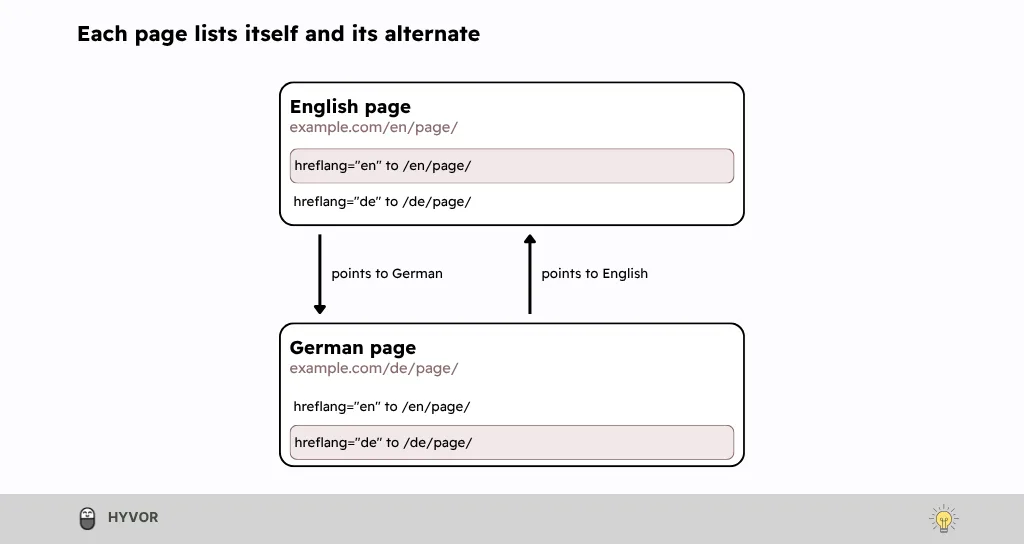
Each page lists itself and points to the other.
Hreflang doesn't redirect anyone, either. Readers still land on whichever URL they click; the tags only change which URL Google offers them.
Do You Need Hreflang Tags?
You need hreflang tags when the same page exists in more than one language, or for more than one region. If it doesn't, you don't.
Your situation | Hreflang tags? |
One language, one region | No |
A post translated into German and French | Yes, on the post and on each translation |
A post that exists only in English | No. There's nothing to point to. |
US and UK English versions with different spelling, prices, or offers | Yes, with en-US and en-GB |
Two near-identical URLs in the same language and region | No hreflang needed if there's no language or regional difference. Pick one URL and use a canonical tag. |
If you blog on Hyvor Blogs, you don't write them by hand. We add them to your index and post pages automatically, and to a post only once its translations are published. See how multilingual publishing works.
Is Hreflang Important?
For a site in more than one language or region, yes. Hreflang tags are how you tell Google which pages are versions of each other, so it can show each reader the most appropriate one. If your blog has only one language version and doesn't use separate URLs for different regional audiences, you generally don't need them.
Is Hreflang a Ranking Factor?
Google describes hreflang as a way to point readers to the most appropriate version of a page by language or region. It doesn't present it as something that lifts a page's position for everyone. Its own blog says the annotations help it "rank the right page for the right users". That's about choosing between your versions.
Hreflang Syntax: Language Codes, Region Codes and x-default
Here's a single hreflang tag:
<link rel="alternate" hreflang="en" href="https://example.com/en/hreflang-tags/" />
It has three parts:
rel="alternate"says the linked URL is another version of this page.hreflang="en"is the hreflang attribute. It gives the language of that version, and optionally its region.hrefis the full URL of that version.
Language and Region Codes
Google's rules for the hreflang value:
The language comes first, as an ISO 639-1 code:
en,de,fr.The region is optional and comes second, as an ISO 3166-1 Alpha-2 code:
en-GB,de-AT. A region on its own isn't valid.Use
en-GB, noten-UK. Google says that EU, UN, or UK in hreflang "doesn't have an effect on Google Search".Codes outside those standards aren't among Google's supported values. That includes
es-419for Latin American Spanish.To specify a script, use an ISO 15924 code:
zh-Hansfor Simplified Chinese,zh-Hantfor Traditional.Every URL has to be fully qualified, including
https://.
The W3C adds two sensible habits: keep the code as short as the content allows, add a region only when it tells the reader something, and separate the parts with a hyphen. Case doesn't matter, so pick one style, such as en-GB, and use it everywhere.
What x-default Does
x-default is the fallback: a language and region-neutral URL for readers whose language or region doesn't match any of your versions. Say a page has English and Spanish versions and an x-default pointing to the English one. French-speaking readers match neither language, so Google can use the English page as the fallback. Google's blog says the x-default page can be a language or country selector, a page for readers you have no content for, or simply the version you consider your default. Google's documentation says the value was designed for language selector pages and works best with them, and it recommends adding it. It isn't required.
<link rel="alternate" hreflang="x-default" href="https://example.com/" />
How to Add Hreflang Tags
You can put hreflang tags in three places: the <head> of each page, your XML sitemap, or an HTTP header. Google treats the three as equivalent, and using more than one gives no extra benefit in Search.
In the HTML Head
Add one <link> tag per version to the <head> of every version. Google needs the tags inside a well-formed <head>, and says not to combine hreflang with other attributes, such as media, in the same tag. This is the usual choice for a blog, because the theme or platform can print the tags for you.
In the XML Sitemap
Declare the xhtml namespace, then give each <url> entry one xhtml:link line for every version, itself included:
<?xml version="1.0" encoding="UTF-8"?>
<urlset xmlns="http://www.sitemaps.org/schemas/sitemap/0.9"
xmlns:xhtml="http://www.w3.org/1999/xhtml">
<url>
<loc>https://example.com/en-us/hreflang-tags/</loc>
<xhtml:link rel="alternate" hreflang="en-US" href="https://example.com/en-us/hreflang-tags/" />
<xhtml:link rel="alternate" hreflang="en-GB" href="https://example.com/en-gb/hreflang-tags/" />
<xhtml:link rel="alternate" hreflang="de" href="https://example.com/de/hreflang-tags/" />
<xhtml:link rel="alternate" hreflang="x-default" href="https://example.com/" />
</url>
<url>
<loc>https://example.com/de/hreflang-tags/</loc>
<xhtml:link rel="alternate" hreflang="en-US" href="https://example.com/en-us/hreflang-tags/" />
<xhtml:link rel="alternate" hreflang="en-GB" href="https://example.com/en-gb/hreflang-tags/" />
<xhtml:link rel="alternate" hreflang="de" href="https://example.com/de/hreflang-tags/" />
<xhtml:link rel="alternate" hreflang="x-default" href="https://example.com/" />
</url>
<url>
<loc>https://example.com/en-gb/hreflang-tags/</loc>
<xhtml:link rel="alternate" hreflang="en-US" href="https://example.com/en-us/hreflang-tags/" />
<xhtml:link rel="alternate" hreflang="en-GB" href="https://example.com/en-gb/hreflang-tags/" />
<xhtml:link rel="alternate" hreflang="de" href="https://example.com/de/hreflang-tags/" />
<xhtml:link rel="alternate" hreflang="x-default" href="https://example.com/" />
</url>
</urlset>
This suits large sites with many versions, or sites where the <head> is hard to change. One exception outside Google: Yandex says it "no longer supports using the Sitemap file for language versions".
In an HTTP Header
Files without a <head>, such as PDFs, can send their alternates in a Link header:
Link: <https://example.com/files/guide-en.pdf>; rel="alternate"; hreflang="en",
<https://example.com/files/guide-de.pdf>; rel="alternate"; hreflang="de"
It needs access to the server's configuration, and it's easy to forget to update when the files change.
Which Method Should You Choose?
For most blogs, use HTML tags. Whichever you pick, use one method and treat it as the single source of truth. Two methods that drift apart are harder to debug than one that's simply wrong.
A Complete Hreflang Tags Example
Say a post exists in three versions (US English, UK English and German), and the site has a language selector at its root. Every page in that set carries this block in its <head>:
<link rel="alternate" hreflang="en-US" href="https://example.com/en-us/hreflang-tags/" />
<link rel="alternate" hreflang="en-GB" href="https://example.com/en-gb/hreflang-tags/" />
<link rel="alternate" hreflang="de" href="https://example.com/de/hreflang-tags/" />
<link rel="alternate" hreflang="x-default" href="https://example.com/" />
The block is identical on every page. On the US page, the en-US line is its self-reference; on the German page, it's the de line. Three rules to check it against:
List the page itself. Google: "Each language version must list itself as well as all other language versions." So yes, hreflang tags should point to the page they're on.
List every other version, and make sure each of those lists this one back.
Use full URLs, including
https://.
A page doesn't have to list a language it doesn't have. If one post exists in English and German but not in French, its set holds only the English and German lines. Google also says that when keeping a complete set of links becomes hard, "you can omit some languages on some pages", and it will still process the pages that point to each other. Just link any newly added language back and forth with your original language.
Hreflang vs. Canonical Tags, Redirects and the lang Attribute
Three other signals sit close to hreflang, and mixing them up causes several of the mistakes in the next section.
Canonical Tags
Each language version should be its own canonical, and the URLs in your hreflang tags should be those canonical URLs. Google's advice is to "specify a canonical page in the same language", and it notes that it "prefers URLs that are part of hreflang clusters". Put hreflang on rel="alternate" links, too: Google doesn't use canonical tags that carry an hreflang attribute for canonicalization. If your platform lets you set a custom canonical per post, as Hyvor Blogs does, make sure a translation's canonical doesn't point at the original.
Redirects
Google says to "avoid automatically redirecting users from one language version of a site to a different language version", and not to swap content based on the visitor's IP address. Googlebot crawls without an Accept-Language header and mostly from US IP addresses, so it may never see versions that depend on either. Give each version its own URL, and link to the other versions where readers can see them.
The lang Attribute
The lang attribute on the <html> tag declares the language of the page you're on. Hreflang points to the other versions. Google uses neither to detect language, but keep lang anyway: it lets screen readers "load the correct pronunciation rules". Hyvor Blogs sets it from the language code you choose for each language.
Common Hreflang Mistakes and How to Fix Them
Hreflang mistakes are common. When Ahrefs looked at 374,756 domains using hreflang in 2023, 15.3% were missing return tags and 16.9% pointed to redirected or broken pages. These are the ones to look for:
Mistake | What happens | Fix |
Missing return links | Google may ignore annotations that lack return links. | Print the same set on every version, generated from one list of URLs. |
Wrong language or region codes | A region on its own isn't valid; | Use ISO 639-1 for language and ISO 3166-1 Alpha 2 for region, such as |
No self-reference | Google says each version "must list itself". | Add the page's own URL to its set. |
Alternatives that redirect, error, are noindexed, or aren't canonical | You're pointing Google at a URL it won't index. | List the final, canonical URL that returns a 200 status and can be indexed. |
Tags outside the | Google reads hreflang only in a well-formed | Move the tags into the |
The first two are the easiest to show in code:
<!-- WRONG: the German page doesn't link back to the English one -->
<!-- https://example.com/en/page/ -->
<link rel="alternate" hreflang="en" href="https://example.com/en/page/" />
<link rel="alternate" hreflang="de" href="https://example.com/de/page/" />
<!-- https://example.com/de/page/ -->
<link rel="alternate" hreflang="de" href="https://example.com/de/page/" />
<!-- CORRECTED: both pages carry the same set -->
<!-- https://example.com/de/page/ -->
<link rel="alternate" hreflang="en" href="https://example.com/en/page/" />
<link rel="alternate" hreflang="de" href="https://example.com/de/page/" />
<!-- WRONG code: UK isn't a region code that has any effect -->
<link rel="alternate" hreflang="en-UK" href="https://example.com/en-gb/page/" />
<!-- CORRECTED -->
<link rel="alternate" hreflang="en-GB" href="https://example.com/en-gb/page/" />
Two things look like mistakes but aren't. A missing x-default is a recommendation you haven't followed, not an error. And using both HTML tags and a sitemap isn't wrong, since Google treats them as equivalent; it just gives you two lists to keep in sync.
How to Check Hreflang Tags
You don't need special tools to check a small blog. Start with these steps:
View the source. Open one page in each language, view its source (Ctrl+U, or Cmd+Option+U on a Mac), and search for "hreflang". Check that the tags sit in the
<head>and that every version shows the same set.Check every URL in the set. Each one should return a 200 status, not redirect, carry a canonical that points to itself, and not be marked noindex.
Crawl larger sites. Past a handful of pages, a crawler with an hreflang report will find missing return links and bad codes faster than you can. Google notes that third-party tools like these "are not maintained or checked by Google", so treat their reports as a guide.
Use URL Inspection in Search Console. It shows whether a URL is on Google, and compares the canonical you declared with the one Google chose. It doesn't report on hreflang.
Search Console used to have an International Targeting report with hreflang errors. That report is deprecated, but Google says it "will continue to support and use hreflang tags".
Hreflang Best Practices
Before publishing, check that your hreflang annotations are set up correctly:
Use the right implementation method. If you use HTML tags, place them in the
<head>of each page. If you use a sitemap or HTTP headers, check that implementation instead.Link the language versions correctly. Each version should list itself and its alternate versions, with reciprocal links between them.
Use valid language and region codes. Use
en-GB, noten-UK, and include the language code even when you target a specific region.Use the correct URLs. Use full URLs that point to the canonical version of each page, and make each translation's canonical point to itself. As a practical check, confirm that each URL returns a successful response and can be indexed.
Check again after changes. Test at least one complete set of translated pages, and repeat the check whenever you add a language or change a URL.
Frequently Asked Questions About Hreflang Tags
Do all pages need hreflang tags?
No, only pages that have an equivalent in another language or region. A post that exists in one language has nothing to point to.
Is x-default required?
No. Google recommends it as the fallback for readers whose language or region doesn't match any version, and says it works best on a language or country selector page.
Can hreflang point to a different domain?
Yes. Google says "alternate URLs do not need to be in the same domain", so example.com can list example.de as its German version.
What happens if hreflang tags have errors?
Google may ignore annotations that lack return links, and it doesn't support codes outside its list of values. Fix the tags, then check them again with the steps above.
Conclusion
Hreflang tags do one job: they tell search engines which pages are versions of each other, so each reader can get the one in their language. They work when the codes are valid, the URLs are full and canonical, and every page in the set points back.
Start small. Pick one post that exists in two languages, view the source of both, and check that each lists the other. Fix that pair before you audit the rest, and check again whenever you add a language. If you're setting up a multilingual blog on Hyvor Blogs, our language docs cover the setup.
A translation only counts once search engines know it exists.